

 Banko Stoyanov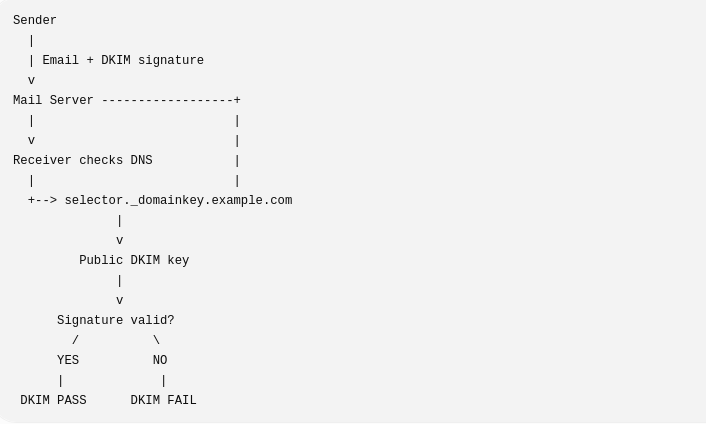
DKIM stands for DomainKeys Identified Mail. It is an email authentication method that helps prove that an email:
- Really came from the domain it claims to come from, and
- Wasn’t modified after it was sent.
How DKIM works
Suppose you send an email from:
alice@example.com
1. Your mail server signs the email
The sending server creates a unique digital signature using a private cryptographic key.
That signature is added to the email headers, something like: DKIM-Signature: v=1; d=example.com; s=default;
Here:
d=example.com→ the domain signing the messages=default→ the selector, which identifies which DKIM key to use
2. The public key is published in DNS
The domain owner publishes the corresponding public key in a DNS TXT record.
For example: default._domainkey.example.com
might contain: v=DKIM1; k=rsa; p=PUBLIC_KEY_HERE
3. The receiving mail server verifies it
When Gmail, Outlook, or another receiving server gets the email, it:
- Reads the
DKIM-Signature - Sees the domain (
d=example.com) and selector (s=default) - Looks up the public key in DNS
- Uses that public key to verify the signature
If the signature matches, the email passes DKIM.
Why DKIM is important
DKIM helps protect against:
- Email spoofing
- Email tampering
- Some forms of phishing
- Messages being treated as suspicious or spam
It is commonly used together with:
- SPF — checks whether a server is allowed to send email for a domain.
- DMARC — defines what receivers should do when SPF/DKIM authentication fails and adds alignment/reporting.
A useful way to remember them is:
| Technology | Main job |
|---|---|
| SPF | Is this server allowed to send for this domain? |
| DKIM | Was this message signed by the domain and unchanged? |
| DMARC | Do SPF/DKIM align with the visible From address, and what happens if they fail? |
In short: DKIM is like putting a tamper-evident digital seal on an email. The recipient can check the seal using a public key published in the sender’s DNS records.
More useful information you need to know
DKIM is a short form of electronic signature for emails that uses a pair of keys – private and public.
How it works:
The server that sends the email signs it with the private key.
The receiving server takes the public key from the domain’s DNS record and checks whether the signature is valid and whether the message has not been modified.
Depending on how you send emails:
If you send directly from our site/server – The signing is done with a key generated in the account. The public key is published in the domain’s DNS so that the receiving servers can verify the authenticity.
If you send only through Microsoft 365 (Outlook / Exchange Online). Microsoft signs the emails with its own key generated specifically for your domain. You must publish their public key in the DNS (they provide you with the correct record).
If you are sending from both places (from the site via our server and via Microsoft). Both DKIM records (with different selectors) should be published in the DNS. This is completely normal and recommended practice.
 Banko Stoyanov

