

 Banko Stoyanov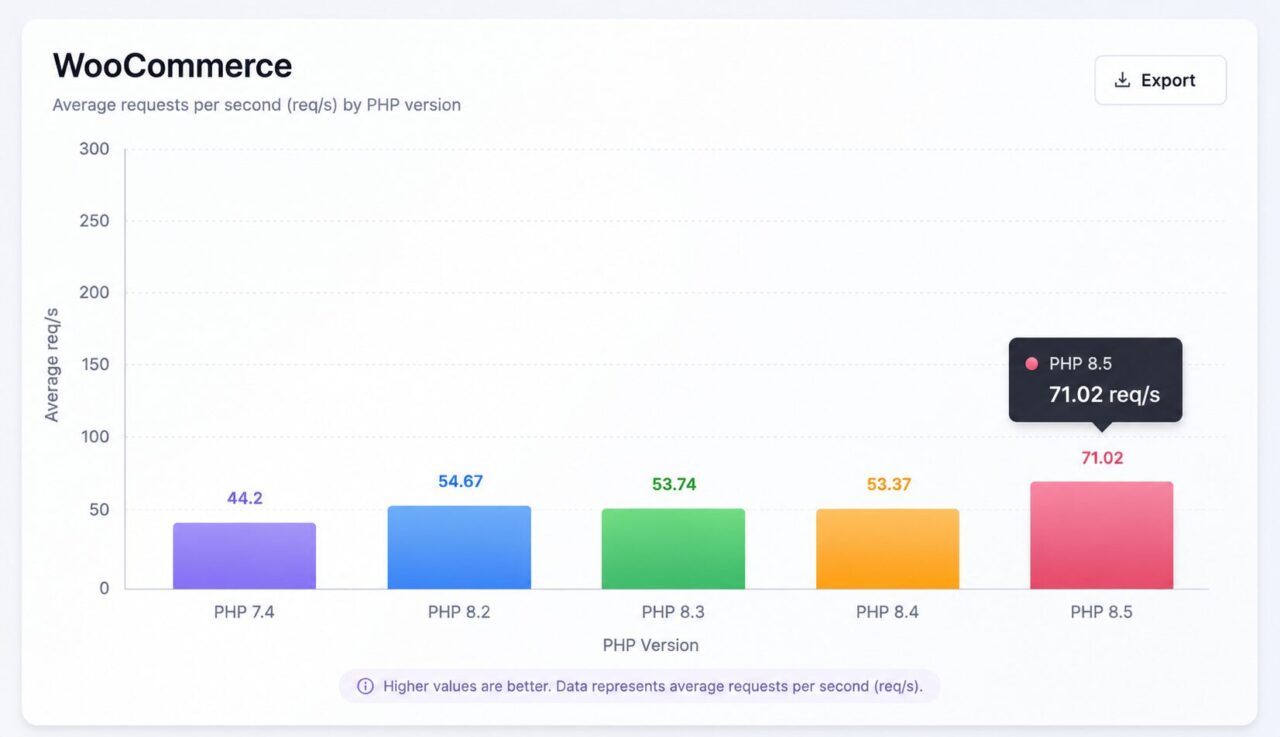
WooCommerce is one of the most powerful eCommerce platforms in the world, but its performance depends on more than just quality hosting and optimized plugins. One of the most overlooked factors is the PHP version your website is running.
Our benchmark clearly demonstrates that upgrading to a newer PHP version can significantly improve the number of requests your WooCommerce store can process every second.
WooCommerce Performance by PHP Version.
The tasted page was the product listing page (/?post_type=product) with WooCommerce 10.2.2 on WordPress 6.8:
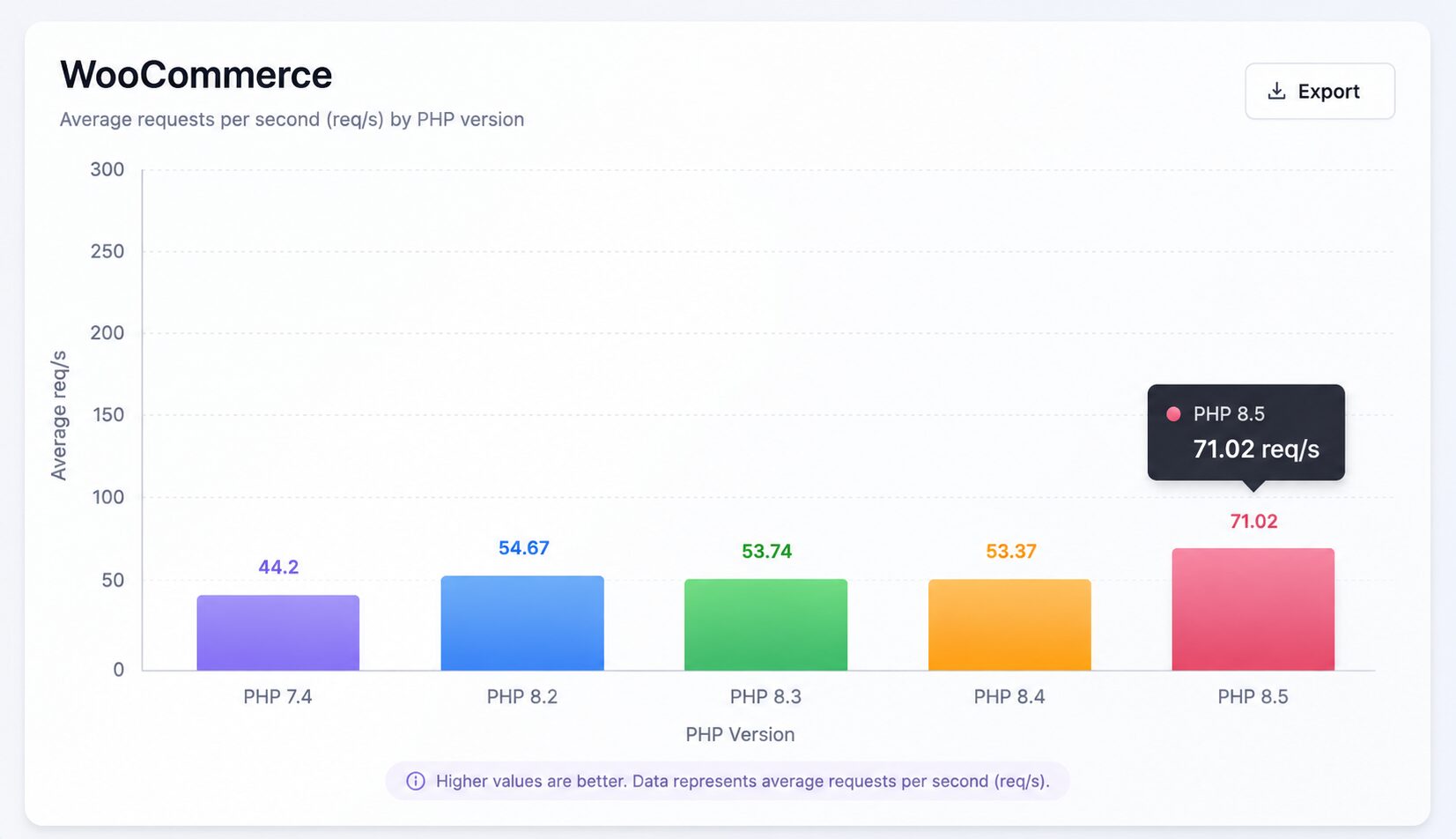
Average requests per second (higher is better).
Why WooCommerce gains more than normal WordPress
- Plain WordPress homepage: only ~6–7% faster (139 → 148 req/s).
- WooCommerce product page: ~21% faster.
WooCommerce pages do a lot more PHP work:
- Complex product queries
- Stock & price calculations
- Tax calculations
- Session / cart handling
- More template logic and object creation
Because a higher percentage of the request time is spent executing PHP code (instead of just waiting for the database), the improvements in the PHP 8 engine become more visible.
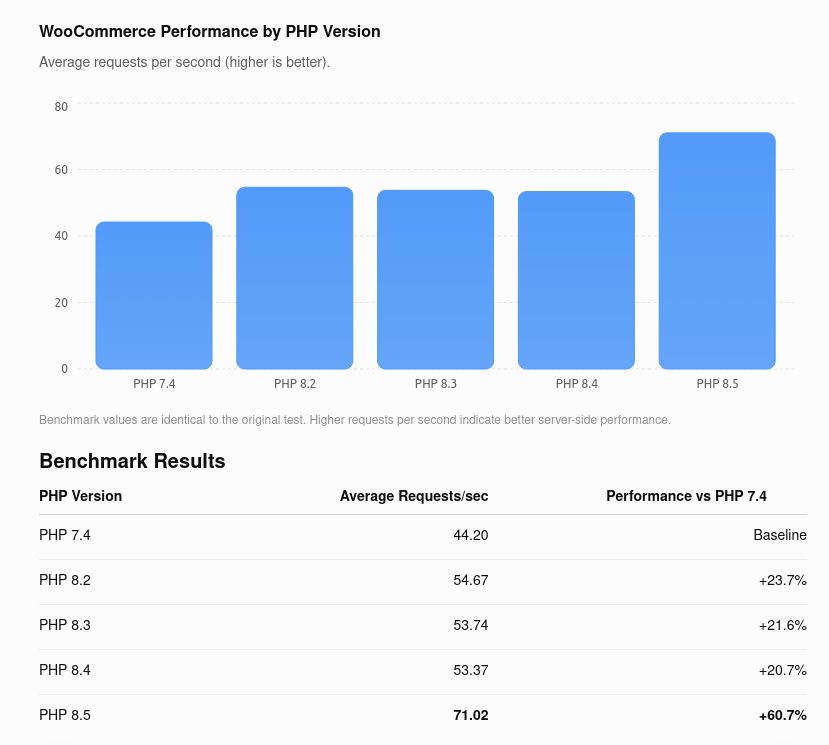
Benchmark values are identical to the original test. Higher requests per second indicate better server-side performance.
Benchmark Results
| PHP Version | Average Requests/sec | Performance vs PHP 7.4 |
|---|---|---|
| PHP 7.4 | 44.20 | Baseline |
| PHP 8.2 | 54.67 | +23.7% |
| PHP 8.3 | 53.74 | +21.6% |
| PHP 8.4 | 53.37 | +20.7% |
| PHP 8.5 | 71.02 | +60.7% |
The results speak for themselves. PHP 8.5 processes approximately 61% more requests per second than PHP 7.4 while using the same WooCommerce workload.
* The big jump on PHP 8.5 is partly because the response size dropped significantly (from ~87 KB to ~54 KB), so it’s not a pure engine comparison.
Why Does PHP Version Matter?
Every page on a WordPress website is generated by PHP. Whenever a visitor opens a page, searches for a product, adds an item to the cart, or completes checkout, PHP executes the code behind those actions.
A newer PHP engine is more efficient because it:
- Executes code faster.
- Uses server resources more efficiently.
- Reduces CPU usage.
- Handles more simultaneous visitors.
- Improves response times under heavy traffic.
For WooCommerce stores, where every customer interaction involves database queries and dynamic content, these improvements become even more noticeable.
PHP 8.4 Specific Improvements
PHP 8.4 added some targeted speedups:
- Much faster SHA-256 (SHA-NI hardware instructions) — 2–5× in some cases
- Frameless internal functions
- Better get_browser() performance
- New IR-based JIT foundation
These rarely move the needle much on full application throughput.
What this means in practice?
- If your site is CPU-bound (very common on uncached WooCommerce pages — product pages, cart, checkout, My Account, filters, admin, etc.), you should expect roughly 20–35% more capacity on the same hardware after moving to PHP 8.5.
- In the best cases (when the site benefits from the 8.5 changes), it can approach 40–50%+ on certain pages.
This means:
- Higher concurrent traffic before the CPU maxes out
- Lower CPU usage at the same traffic level
- More breathing room for traffic spikes
- Better performance under load (less queuing of PHP workers)
Important caveats
- Only helps if PHP is the bottleneck If the real problem is slow database queries, missing object cache (Redis), heavy plugins, or external API calls, the gain will be smaller.
- Uncached pages benefit most Cart, checkout, account pages, and filtered product listings see the biggest improvement. Fully cached pages barely care about PHP version.
- Other things still matter more
- Proper object caching (Redis)
- Enough PHP workers/threads
- Database optimization
- Good hosting (not oversold shared)
What This Means for WooCommerce Stores
A faster PHP version directly benefits your business.
Faster Shopping Experience
Customers browse products more smoothly, category pages load faster, and checkout becomes more responsive.
Better Handling of Traffic Peaks
During promotions, Black Friday, or seasonal sales, your server can handle more concurrent visitors before performance starts to degrade.
Lower Server Load
Because PHP executes requests more efficiently, your hosting environment spends less CPU time processing each request. This often translates into better stability and reduced hosting costs.
Improved User Experience
Website speed has a direct impact on customer satisfaction. Faster websites encourage visitors to browse more pages and complete purchases more often.
Security Benefits
Performance isn’t the only reason to stay current.
Modern PHP releases also include:
- Active security support
- Bug fixes
- Better compatibility with current WordPress and WooCommerce versions
- Improved support for modern development standards
Older PHP versions eventually reach end-of-life, meaning they no longer receive security updates.
Should You Upgrade Immediately?
In most cases, yes.
Before upgrading, you should verify that:
- Your WordPress installation is fully updated.
- WooCommerce is running the latest stable version.
- Your active theme supports the target PHP version.
- All plugins are compatible with the newer PHP release.
Testing the upgrade in a staging environment is always recommended before deploying it to a live store.
Final Thoughts
Your hosting provider is only part of the performance equation. Even on excellent infrastructure, an outdated PHP version can become a bottleneck.
This benchmark demonstrates that simply upgrading from PHP 7.4 to PHP 8.5 can increase WooCommerce throughput by more than 60%, without changing your hardware or migrating to a different server.
If you’re looking for one of the easiest ways to make your WordPress or WooCommerce website faster, upgrading to the latest supported PHP version should be one of your highest priorities.
If a WooCommerce site is already hitting its CPU limit on PHP 7.4, upgrading to PHP 8.5 will give you meaningful extra capacity.
WooCommerce site that is maxing out CPU on PHP 7.4 will have clearly more headroom after upgrading to PHP 8.5 (usually in the 20–35% range, sometimes higher). It’s one of the highest-ROI upgrades you can do when you’re already CPU-constrained.


